.webp)
92
0
0
OpenList美化

文章摘要
效果展示
开屏效果
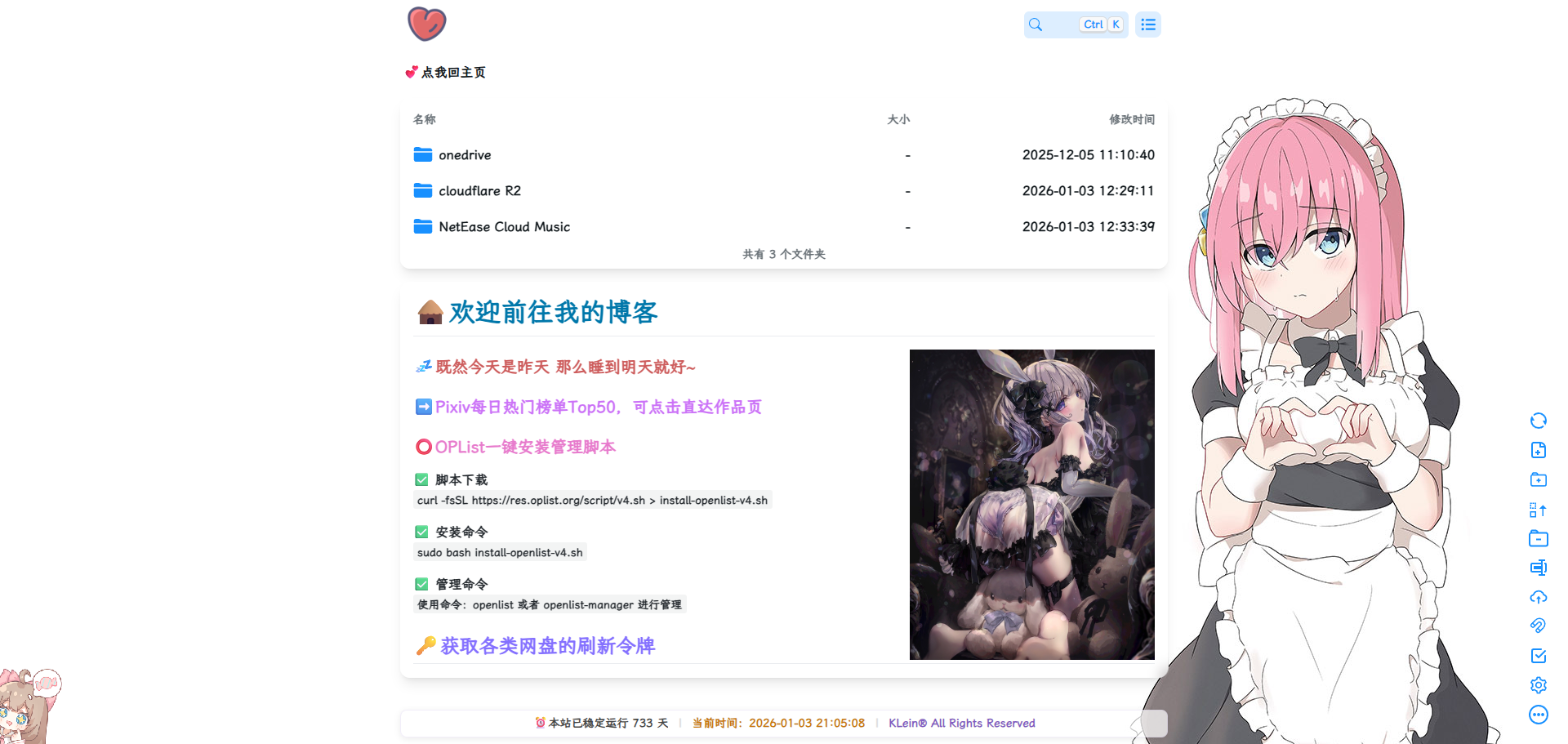
主界面效果
自定义头部
<!-- ==================== 预连接及字体样式引入 ==================== -->
<link rel="preconnect" href="https://api.paugram.com" crossorigin>
<link rel="preconnect" href="https://www.hidekk.cn" crossorigin>
<link rel="preconnect" href="https://cdn.jsdelivr.net" crossorigin>
<link rel="stylesheet" href="https://npm.elemecdn.com/lxgw-wenkai-webfont@1.7.0/lxgwwenkai-regular.css">
<!-- ==================== openlist全局美化 ==================== -->
<style>
* {
    margin: 0;
    padding: 0;
    box-sizing: border-box;
}

*:not([class*=icon]):not(i) {
    font-family: 'LXGW WenKai', sans-serif !important;
    font-weight: 800;
}

body {
    overflow-x: hidden;
    min-height: 100vh;
    position: relative;
    display: flex;
    flex-direction: column;
}

.main-content {
    flex: 1;
}

/* 自定义鼠标指针 */
body {
    cursor: url(https://raw.githubusercontent.com/mocchen/cssmeihua/mochen/a.cur), default;
}

/* =============== 背景图设置 =============== */
/* 白天背景图 */
.hope-ui-light {
    background-image: url("https://api.paugram.com/wallpaper/?source=gh,sm") !important;
    background-repeat: no-repeat;
    background-size: cover;
    background-attachment: fixed;
    background-position-x: center;
}

/* 夜间背景图 */
.hope-ui-dark {
    background-image: url("https://api.paugram.com/wallpaper/?source=gh,sm") !important;
    background-repeat: no-repeat;
    background-size: cover;
    background-attachment: fixed;
    background-position-x: center;
}

/* 图片API */
  Sretna:https://api.hanximeng.com/ranimg/api.php
  保罗:https://api.paugram.com/wallpaper/?source=gh,sm

/* =============== 通知栏样式 =============== */
/* 去除通知栏右上角 X */
.notify-render .hope-close-button {
    display: none;
}

/* =============== 通用背景透明样式 =============== */
/* 主列表透明 */
.obj-box.hope-stack.hope-c-dhzjXW.hope-c-PJLV.hope-c-PJLV-igScBhH-css,
/* readme透明 */
.hope-c-PJLV.hope-c-PJLV-ikSuVsl-css,
/* 白天模式主框体毛玻璃 */
.hope-c-PJLV-igScBhH-css {
    background-color: rgba(255, 255, 255, 0.5) !important;
    backdrop-filter: blur(8px);
}

/* =============== 顶部导航条透明系列 =============== */
/* 顶条透明1 */
.hope-c-jKOUQW.hope-c-PJLV.hope-c-PJLV-ikaMhsQ-css,
/* 顶条透明2 */
.hope-c-hrsMRY.hope-c-PJLV.hope-c-PJLV-idaeksS-css,
/* 顶部透明(未吸附) */
.hope-c-PJLV-ikaMhsQ-css {
    background-color: rgba(255, 255, 255, 0) !important;
}

/* =============== 按钮透明样式 =============== */
/* 顶部右上角切换按钮透明 */
.hope-c-ivMHWx-kcPQpq-cv.hope-icon-button {
    background-color: rgba(255, 255, 255, 0.1) !important;
}

/* 右下角侧边栏按钮透明 */
.hope-c-PJLV-ijgzmFG-css {
    background-color: rgba(255, 255, 255, 0.3) !important;
}

/* =============== 搜索框样式 =============== */
/* 白天模式搜索输入框 */
.hope-ui-light .hope-c-kvTTWD-hYRNAb-variant-filled {
    background: rgba(255, 255, 255, 0.3) !important;
    backdrop-filter: blur(5px) !important;
}

/* 白天模式搜索按钮 */
.hope-ui-light .hope-c-PJLV-ikEIIxw-css {
    background: rgba(255, 255, 255, 0) !important;
}

/* 夜间模式搜索输入框 */
.hope-ui-dark .hope-c-kvTTWD-hYRNAb-variant-filled {
    background: rgb(0 0 0 / 10%) !important;
    backdrop-filter: blur(5px) !important;
}

/* 夜间模式搜索按钮 */
.hope-ui-dark .hope-c-PJLV-ikEIIxw-css {
    background: rgb(0 0 0 / 10%) !important;
}

/* =============== 代码块样式 =============== */
/* 白天模式代码块 */
.hope-ui-light pre {
    background-color: rgba(255, 255, 255, 0.1) !important;
}

/* 夜间模式代码块 */
.hope-ui-dark pre {
    background-color: rgba(255, 255, 255, 0) !important;
}

/* =============== 主题模式特定样式 =============== */
/* 黑夜模式主框体毛玻璃 */
.hope-c-PJLV-iigjoxS-css {
    background-color: #00000090 !important;
    backdrop-filter: blur(8px);
}

/* =============== 布局与底部样式 =============== */
/* 底部整体样式 */
dibu {
    border-top: 0px;
    position: absolute;
    bottom: 0;
    width: 100%;
    margin: 0px;
    padding: 0px;
}

/* 应用容器最小高度 */
.App {
    min-height: 85vh;
}

/* 表格居中 */
.table {
    margin: auto;
}

/* 隐藏底部footer */
.footer {
    display: none !important;
}

/* =============== 特殊文本样式 =============== */
/* 主页两个字 */
.hope-c-PJLV-iehpHsP-css {
    font-size: 16px;
}

/* =============== 网站信息面板 =============== */
/* 网站信息面板样式 */
.simple-site-info {
    width: 100%;
    text-align: center;
    font-size: 14px;
    color: #444;
    line-height: 1.4;
    padding: 8px 0;
    /* 移除 pointer-events: none; 以允许点击超链接 */
    margin-top: auto;
}

/* 固定容器宽度,并设置最小宽度确保可读性 */
.site-info-content {
    display: inline-flex;
    align-items: center;
    flex-wrap: nowrap; /* 禁止换行 */
    justify-content: center;
    gap: 8px;
    background-color: rgba(255, 255, 255, 0.7) !important;
    padding: 6px 16px;
    border-radius: 8px;
    box-shadow: 0 2px 8px rgba(0, 0, 0, 0.08);
    border: 1px solid rgba(126, 87, 194, 0.1);
    width: 940px; /* 固定宽度 */
    max-width: 90%; /* 最大宽度为屏幕的90% */
    min-width: 300px; /* 最小宽度确保内容可读 */
    margin: 0 auto;
    overflow: hidden; /* 超出部分隐藏 */
}

/* 文本截断样式 */
.site-info-content .running-time,
.site-info-content .current-time,
.site-info-content .copyright-info {
    white-space: nowrap; /* 禁止文本换行 */
    overflow: hidden; /* 超出部分隐藏 */
    text-overflow: ellipsis; /* 超出部分显示省略号 */
    flex-shrink: 1; /* 允许缩小 */
    min-width: 0; /* 允许缩小到0 */
}

/* 分隔符不需要截断 */
.site-info-content .separator {
    flex-shrink: 0; /* 禁止缩小 */
}

.current-time {
    color: #C9750C;
    font-weight: 600;
}

.separator {
    color: #ddd;
    margin: 0 4px;
    font-weight: 300;
}

.copyright-info a {
    color: #7e57c2;
    text-decoration: none;
    font-weight: 500;
    transition: color 0.2s ease;
    white-space: nowrap; /* 链接文本不换行 */
    overflow: hidden;
    text-overflow: ellipsis;
}

.copyright-info a:hover {
    color: #5e35b1;
    text-decoration: underline;
}

.badge {
    display: inline-block;
    background: linear-gradient(135deg, #7e57c2, #5e35b1);
    color: white;
    font-size: 9px;
    padding: 1px 6px;
    border-radius: 8px;
    font-weight: bold;
    letter-spacing: 0.3px;
    margin-left: 6px;
    vertical-align: middle;
    flex-shrink: 0; /* 禁止缩小 */
}

@media (max-width: 768px) {
    .simple-site-info {
        font-size: 13px;
    }

    .site-info-content {
        padding: 5px 12px;
        min-width: 280px; /* 在小屏幕上稍微减小最小宽度 */
    }

    /* 在小屏幕上进一步调整截断行为 */
    .site-info-content .running-time,
    .site-info-content .current-time,
    .site-info-content .copyright-info {
        max-width: 45%; /* 限制最大宽度,确保各元素都能显示一部分 */
    }
}
</style>
自定义内容
<!-- ==================== 开屏动画 ==================== -->
<script>
// 检查是否已播放过开屏动画
if (!sessionStorage.getItem('markdown_splash_shown')) {
    sessionStorage.setItem('markdown_splash_shown', 'true');

    // 配置参数
    const CONFIG = {
        splash: {
            backgroundColor: 'white',
            zIndex: 99999,
            fadeInDelay: 100,
            fadeOutDelay: 3200,
            fadeDuration: 650,
        },
        logoContainer: {
            width: 250,
            height: 250,
        },
        logo: {
            src: 'https://www.hidekk.cn/upload/KLeinStorage.png',
            fadeInDelay: 900,
            fadeDuration: 800,
            dropShadow: '0 0 10px rgba(255,255,255,0.3)',
        },
        highlight: {
            width: 80,
            height: 400,
            color: 'rgba(255, 255, 255, 0.5)',
            animationDelay: 2100,
            animationDuration: 500,
        },
    };

    // 创建开屏动画元素
    const splash = document.createElement('div');
    splash.id = 'splash-screen';

    const container = document.createElement('div');
    container.id = 'logo-container';

    const logo = document.createElement('img');
    logo.id = 'splash-logo';
    logo.src = CONFIG.logo.src;
    logo.alt = 'Logo';

    const highlight = document.createElement('div');
    highlight.id = 'highlight';

    // 组装元素
    container.appendChild(logo);
    splash.appendChild(container);
    splash.appendChild(highlight);
    document.body.appendChild(splash);

    // 添加样式
    const style = document.createElement('style');
    style.textContent = `
        #splash-screen {
            position: fixed;
            top: 0;
            left: 0;
            width: 100%;
            height: 100%;
            background: ${CONFIG.splash.backgroundColor};
            z-index: ${CONFIG.splash.zIndex};
            opacity: 0;
            pointer-events: none;
            transition: opacity ${CONFIG.splash.fadeDuration}ms ease;
        }

        #logo-container {
            position: absolute;
            top: 50%;
            left: 50%;
            transform: translate(-50%, -50%);
            width: ${CONFIG.logoContainer.width}px;
            height: ${CONFIG.logoContainer.height}px;
            overflow: hidden;
        }

        #splash-logo {
            width: 100%;
            height: auto;
            opacity: 0;
            transition: opacity ${CONFIG.logo.fadeDuration}ms ease;
            filter: drop-shadow(${CONFIG.logo.dropShadow});
            display: block;
        }

        #highlight {
            position: absolute;
            width: ${CONFIG.highlight.width}px;
            height: ${CONFIG.highlight.height}px;
            background: ${CONFIG.highlight.color};
            opacity: 0;
            pointer-events: none;
        }
    `;
    document.head.appendChild(style);

    // 动画控制函数
    let isFadingOut = false;

    function triggerFadeOut() {
        if (isFadingOut) return;
        isFadingOut = true;

        splash.style.opacity = '0';
        setTimeout(() => {
            splash.remove();
            style.remove();
        }, CONFIG.splash.fadeDuration);
    }

    // 支持点击跳过
    document.addEventListener('click', triggerFadeOut);
    document.addEventListener('touchstart', triggerFadeOut, { passive: true });

    // 启动动画序列
    setTimeout(() => {
        splash.style.opacity = '1';
        splash.style.pointerEvents = 'auto';
    }, CONFIG.splash.fadeInDelay);

    setTimeout(() => {
        logo.style.opacity = '1';
    }, CONFIG.logo.fadeInDelay);

    setTimeout(() => {
        highlight.style.opacity = '1';

        // 简化的高光动画
        const containerRect = container.getBoundingClientRect();
        highlight.style.top = `calc(50% - ${CONFIG.highlight.height / 2}px)`;
        highlight.style.left = `calc(50% - ${containerRect.width}px)`;

        highlight.animate([
            { left: `calc(50% - ${containerRect.width}px)` },
            { left: `calc(50% + ${containerRect.width}px)` }
        ], {
            duration: CONFIG.highlight.animationDuration,
            easing: 'linear',
            fill: 'forwards',
        });
    }, CONFIG.highlight.animationDelay);

    // 自动淡出
    setTimeout(triggerFadeOut, CONFIG.splash.fadeOutDelay);
}
</script>

<!-- ==================== 网站信息面板 ==================== -->
<div class="simple-site-info">
    <div class="site-info-content">
        <span class="running-time" id="runtimeDisplay">正在计算运行时间...</span>
        <span class="separator">|</span>
        <span class="current-time" id="currentTimeDisplay">正在获取当前时间...</span>
        <span class="separator">|</span>
        <span class="copyright-info">
            <a href="/@manage" target="_blank">KLein® All Rights Reserved</a>
        </span>
    </div>
</div>

<script>
// 格式化日期函数
function formatDate(date) {
    const year = date.getFullYear();
    const month = String(date.getMonth() + 1).padStart(2, '0');
    const day = String(date.getDate()).padStart(2, '0');
    const hours = String(date.getHours()).padStart(2, '0');
    const minutes = String(date.getMinutes()).padStart(2, '0');
    const seconds = String(date.getSeconds()).padStart(2, '0');

    return `${year}-${month}-${day} ${hours}:${minutes}:${seconds}`;
}

// 计算网站运行时间和当前时间
function calculateSiteInfo() {
    const startDate = new Date("2024-01-01 00:00:00");
    const now = new Date();

    // 计算天数差
    const timeDiff = now.getTime() - startDate.getTime();
    const daysDiff = Math.floor(timeDiff / (1000 * 3600 * 24));

    // 格式化当前时间
    const currentTimeStr = formatDate(now);

    // 更新显示
    document.getElementById("currentTimeDisplay").textContent = `当前时间:${currentTimeStr}`;
    document.getElementById("runtimeDisplay").textContent = `⏰本站已稳定运行 ${daysDiff} 天`;
}

// 页面加载完成后计算并定时更新
window.addEventListener('DOMContentLoaded', function() {
    calculateSiteInfo();
    setInterval(calculateSiteInfo, 1000);
});
</script>

<!-- ==================== 安全设置 ==================== -->
<script>
// 禁用开发者工具和右键菜单
document.addEventListener('contextmenu', (e) => e.preventDefault());
document.addEventListener('selectstart', (e) => e.preventDefault());

document.addEventListener('keydown', (e) => {
    // 禁用F12
    if (e.key === 'F12') {
        e.preventDefault();
        return false;
    }

    // 禁用Ctrl+Shift+I/Ctrl+Shift+J/Ctrl+U
    if (e.ctrlKey && e.shiftKey && ['I', 'J', 'U'].includes(e.key)) {
        e.preventDefault();
        return false;
    }
});
</script>

<!-- ==================== 延迟加载内容 ==================== -->
<!--嘉然live2d-->
<script src="https://cdn.jsdelivr.net/npm/greensock@1.20.2/dist/TweenLite.js"></script>
<script src="https://cubism.live2d.com/sdk-web/cubismcore/live2dcubismcore.min.js"></script>
<script src="https://cdn.jsdelivr.net/npm/pixi.js@5.3.6/dist/pixi.min.js"></script>
<script src="https://cdn.jsdelivr.net/npm/pixi-live2d-display@0.3.1/dist/cubism4.min.js"></script>
<link href="https://cdn.jsdelivr.net/gh/journey-ad/blog-img@76ba2b3/live2d/lib/pio.css" rel="stylesheet" type="text/css"/>
<script src="https://cdn.jsdelivr.net/gh/journey-ad/blog-img@76ba2b3/live2d/lib/pio.js"></script>
<script src="https://cdn.jsdelivr.net/gh/journey-ad/blog-img@76ba2b3/live2d/lib/pio_sdk4.js"></script>
<script src="https://cdn.jsdelivr.net/gh/journey-ad/blog-img@76ba2b3/live2d/lib/load.js"></script>

<!-- 延迟加载检测 -->
<script>
let interval = setInterval(() => {
    if (document.querySelector(".footer")) {
        document.querySelector("#customize")?.style.display = "";
        clearInterval(interval);
    }
}, 200);
</script>
添加一个嘉然看板娘
上面代码里的live2d有时候会非常卡无法正常加载,遂有了自己重新部署一个的想法。
把下面代码插入至自定义内容内即可
<!--嘉然live2d-->
<script src="https://*.cn/live2d/TweenLite.js"></script>
<script src="https://*.cn/live2d/live2dcubismcore.min.js"></script>
<script src="https://*.cn/live2d/pixi.min.js"></script>
<script src="https://*.cn/live2d/cubism4.min.js"></script>
<link href="https://*.cn/live2d/pio.css" rel="stylesheet" type="text/css"/>
<script src="https://*.cn/live2d/pio.js"></script>
<script src="https://*.cn/live2d/pio_sdk4.js"></script>
<script src="https://*.cn/live2d/load.js"></script>

# 使用CF免费R2存储桶提供的存储,把源码文件上传至存储桶设置一下跨域访问就行。源码文件下载:live2d源码文件.zip